What Does COM Mean? Common Terminals on Japanese Equipment
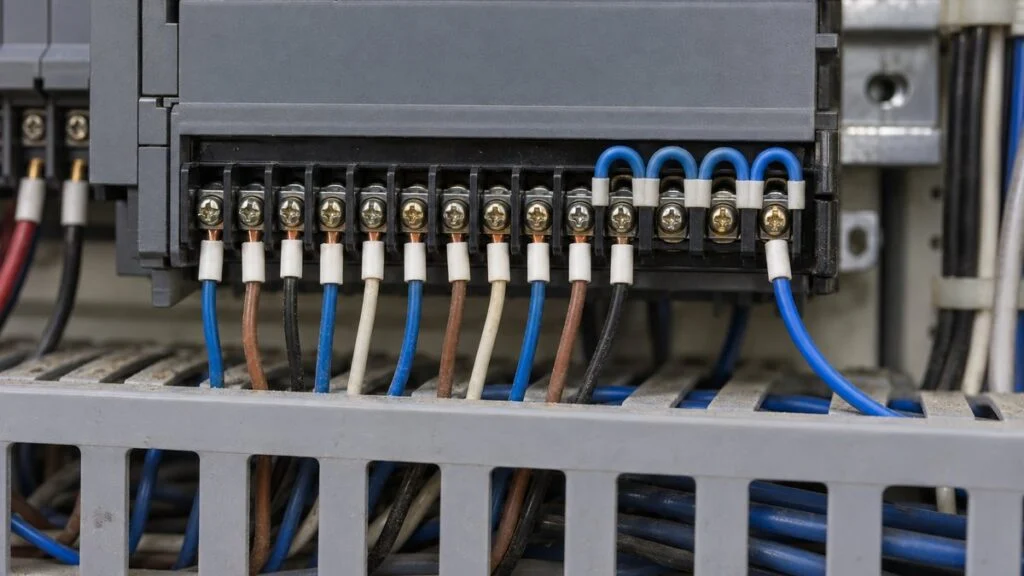
A Japanese supplier sends a panel drawing where three alarm contacts share one terminal marked "COM," and the I/O list says the input module is "8 points / 1 common." In a design review, someone on the Japanese side asks you to "make that a common" (komon ni shite kudasai). Every one of these refers to the same idea.
COM (common) is the side of a circuit that several contacts or I/O points share. The shared wire is called a common wire: komon-sen (コモン線) or kyotsu-sen (共通線) in Japanese. Sharing one side reduces terminals and wires, but it creates two things you have to check: one broken COM wire cuts off every signal on it, and the COM carries the combined current of every point that is ON at the same time.
This guide shows what COM means on a circuit drawing, how it appears on terminal blocks and PLC modules, how it relates to sink/source and NPN/PNP, and when a circuit should not share a common. It ends with a review checklist and questions you can send the Japanese side. It explains how to read drawings and specs; it is not a wiring procedure.
- COM is the terminal or wire shared by several contacts or I/O points. It is labeled "COM" on Japanese drawings and terminals.
- Sharing one side reduces the terminals for n contacts from 2n to n + 1 (from 6 to 4 for three contacts). The circuit works the same way.
- Two risks: one broken COM wire drops every signal on it, and the COM carries the total current of all points that are ON.
- On PLC modules, check "points per common" and the rating per common in the spec. It is set separately from the rating per point.
- Emergency stops, critical alarms, and circuits on different power supplies should not share a common. The COM on a relay changeover contact is a different thing.
Contents
- What COM Means: One Shared Side for Several Contacts
- Where "COM" Appears on Japanese Drawings and Terminals
- How a Common Is Wired: Jumpers on the Terminal Block
- COM on PLC Modules: Points per Common and Current per Common
- Sink, Source, NPN, PNP: Which Side COM Connects To
- When a Circuit Should Not Share a Common
- Checklist: Reviewing COM on a Japanese Drawing or I/O List
- Questions to Send the Japanese Supplier
- Limits of This Guide
- FAQ
- Sources
What COM Means: One Shared Side for Several Contacts
"Common" here simply means shared. Start with a device that sends three signals out through dry contacts, as in the diagram below. A dry contact (mu-den'atsu setten, 無電圧接点) carries no voltage of its own; it only opens and closes. For details, see our guide to dry vs. wet contacts on Japanese specs.
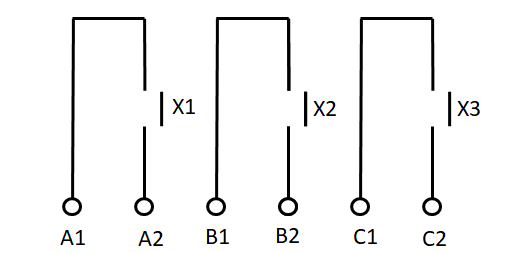
Each contact closes when its relay picks up:
- When relay X1 picks up, A1 and A2 are connected.
- When relay X2 picks up, B1 and B2 are connected.
- When relay X3 picks up, C1 and C2 are connected.
A typical use is a remote indicator. Pressing a switch energizes relay X1, the X1 contact connects A1 and A2 on the output side, and the lamp on the receiving side lights. In other words, the circuit tells a distant location that the switch was pressed.
The switch side powers the relay coil. The relay's contact only closes the receiving side's own lamp circuit.
Redrawn in English from the original Japanese diagram. The 100 V coil supply is the value used in that example.
Put three of these side by side and you get the first diagram: six terminals for three signals. Because the contacts are dry, one side of every contact can be tied together. That shared wire is the common wire. Tying the contacts together this way does not change how each circuit works, and it brings the output down from six terminals to four. The gap grows as you add points.
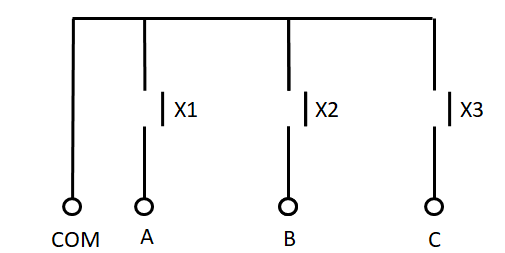
Two terminals per contact means 2n terminals. Sharing one side means n + 1.
The 3-contact row matches the diagrams above. The 8- and 16-contact rows are simple arithmetic; real devices often split their points across several COM terminals.
Here is the same idea with a separate lamp for each relay:
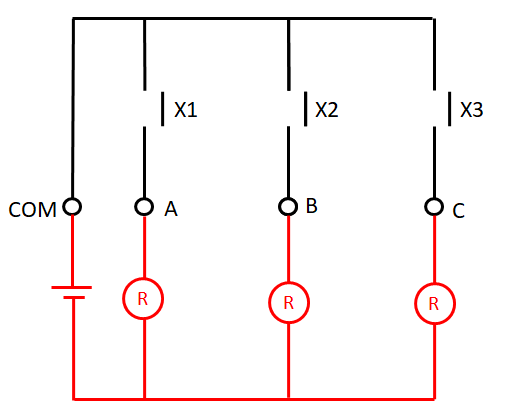
Compared with three separate circuits, the wiring is simpler and the receiving side needs only one power supply. Current leaves through COM, passes through whichever contact is closed and its lamp, and returns to the supply.
The trade-off: if the single COM wire breaks, every signal on it is lost at once. That is why designers sometimes skip the common on circuits that carry truly critical alarms.
Where "COM" Appears on Japanese Drawings and Terminals
You will usually meet COM in three places. In all of them it means "the side shared by several circuits":
- A wire that ties together one side of a row of contacts, as in the circuits above
- A terminal on a PLC I/O module or sensor that several points share (covered below)
- The terminal shared by NO and NC inside a relay's changeover contact (covered in the FAQ)
These Japanese terms often appear next to COM on drawings, terminal lists, and module specs:
| Japanese | Romaji | Meaning |
|---|---|---|
| コモン / コモン線 | komon / komon-sen | Common / common wire |
| 共通線 | kyotsu-sen | Common wire (the Japanese word for the same thing) |
| コモン端子 | komon tanshi | COM terminal |
| 渡り(渡り配線) | watari (watari haisen) | Jumper between neighboring terminals |
| コモン方式 | komon hoshiki | Common configuration in a module spec, e.g., 8点/1コモン = 8 points per common |
| プラスコモン / マイナスコモン | purasu komon / mainasu komon | "Plus common" / "minus common" (see the naming caution below) |
| 無電圧接点 | mu-den'atsu setten | Dry (voltage-free) contact |
| c接点 | c-setten | Changeover (SPDT) contact with COM, NO, and NC |
To read the contact and coil symbols themselves, see how to read Japanese PLC programs, which covers a- and b-contacts in ladder diagrams.
How a Common Is Wired: Jumpers on the Terminal Block
On the actual wiring, a common is simply one side of each contact tied together with jumpers (watari), short wires that link neighboring terminals.
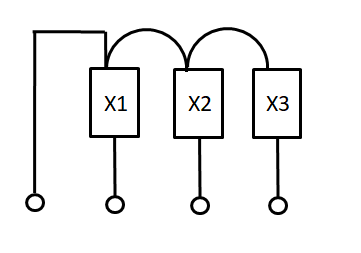
On a terminal block, this is done with short jumper wires or with jumper parts that bridge several terminals, and only one wire leaves from the COM terminal. Using fewer wires than separate circuits also lowers the overall cost.
The catch is current: the common carries the sum of every point's current. If three points are ON together, the common carries all three currents.
You save terminals and wire, but one wire now does several jobs.
COM on PLC Modules: Points per Common and Current per Common
On PLC input modules, relay output modules, and sensor terminal blocks, the terminal shared by several points is labeled "COM." Points on the same COM normally run from the same power supply (same voltage, same circuit). To mix loads with different voltages, choose a module with separate COM groups or independent contacts.
Japanese specs list the grouping as komon hoshiki (common configuration), and it varies by model. Keyence PLCs are a good example:
- KV Nano inputs: all points on one common (one COM terminal)
- KV Nano transistor outputs: 8–10 points per common
- KV Nano relay outputs: 2–4 points per common
- KV-B16RC relay output module: 8 points per common (16 points in two groups)
The rating per point and the rating per common are separate numbers. The KV-B16RC, for example, is rated 2 A per point but only 8 A per common.
Each point can carry 2 A, but you cannot run all eight at 2 A at the same time.
Example values from the Keyence KV-B16RC spec (16-point relay output, 8 points per common). Ratings differ by model; always use the spec sheet for your module.
To check COM current on a design, work through it in this order:
- Look up the current of each load in the load's own spec sheet.
- From the operating conditions, list which points can be ON at the same time.
- Add the currents for each COM group and compare the total with the module's per-common rating.
Sink, Source, NPN, PNP: Which Side COM Connects To
For DC inputs and outputs, the module also defines whether COM goes to the + or − side of the supply. That is where sink/source and NPN/PNP come in. These ON/OFF signals are called DI/DO in control systems. For signal types and directions, see DI/DO vs. AI/AO vs. PI/PO; here we only cover how they affect COM.
- Sensors: Keyence describes an NPN output as the side the load current flows into (sink), and a PNP output as the side it flows out of (source). NPN has long been the norm in Japan and the US, PNP in Europe. Omron explains that Europe favors PNP for safety: a short somewhere in the output wiring does not drive the load.
- PLC transistor outputs: Per Omron, a sink-type output has COM on the − side, and when ON, current flows from the load into the module. A source-type output has COM on the + side, and current flows from the module out to the load.
- Mitsubishi FX inputs: Some FX models switch between sink and source input with the S/S terminal. For sink input, S/S connects to 24 V and the input turns ON when its terminal is connected to 0 V. Source input is the reverse: S/S to 0 V, and the input turns ON when its terminal is connected to 24 V. Mitsubishi's product material pairs sink input with NPN open-collector sensors and source input with PNP.
Match by current direction and by which side of the supply COM connects to, not by the name.
Compiled from public material by Keyence, Omron, and Mitsubishi Electric. The FX rows are based on Mitsubishi's S/S terminal FAQ and its MELSEC iQ-F FX5S product material (sink input with NPN, source input with PNP). The current paths are derived from that wiring. Not every model has an S/S terminal; check the manual for the model you have.
Do not go by the names alone. "Plus common," "minus common," "sink," and "source" can be named from different reference terminals depending on the document. Mitsubishi's FAQ, for example, calls FX sink input "minus common," yet the module's S/S terminal connects to +24 V. From the sensor or switch side, the shared wire is 0 V (−); from the module's COM terminal, it is +. Check these two points on the wiring diagram instead:
- Does the module's COM terminal connect to +24 V or to 0 V?
- When the point is ON, does current flow into the input (or output) terminal, or out of it?
If you need NPN and PNP sensors on one module, the COM arrangement decides it. Keyence notes that mixing is possible on an input module whose COM terminals are not internally connected. If they are internally shorted, Keyence suggests putting the NPN and PNP devices on separate input modules.
When a Circuit Should Not Share a Common
Commons are convenient, but avoid them, or decide carefully, in these cases:
- Critical alarms and emergency stops: when losing every signal to one broken COM wire is unacceptable
- Circuits on different voltages or power supplies: tying separate supplies to one common can cause sneak currents and false operation
- High total current: the common carries the sum of every point's current, so check the wire size and the terminal's current rating
If all three answers are yes, the points are candidates for a shared common.
For how field wiring and panel-internal wiring are divided on Japanese projects, see naisen vs. gaisen.
Checklist: Reviewing COM on a Japanese Drawing or I/O List
- Which points share each COM terminal (the grouping on the drawing matches the module's "points per common")
- Supply voltage and type for each COM group (no mixing of AC and DC, or of different supplies, on one COM)
- Per-point rating and per-common rating from the module spec sheet
- Total current of points that can be ON at the same time, per COM group
- Wire size and terminal current rating for each COM wire
- Whether COM connects to +24 V or 0 V, and the current direction when ON (sink or source)
- NPN or PNP for each sensor, and whether the module's COMs are internally connected
- Emergency stops and critical alarms on their own wiring, or with broken-wire detection
- For relay changeover contacts: which circuit uses NO and which uses NC on the same COM
Questions to Send the Japanese Supplier
- Which terminals on this drawing share a COM, and what is the "points per common" of each module?
- What is the maximum current per COM, and what total current do you expect when all points that can be ON at once are ON?
- Is each input module wired for sink or source (NPN or PNP), and does COM go to +24 V or 0 V?
- Are the emergency stop and critical alarm signals on a separate COM or independent contacts?
- Are any loads with different voltages connected to the same COM?
A short message you can adapt:
Subject: Question on COM grouping, drawing [No.]
Hello [Name],
On drawing [No.], terminals [X–Y] share COM [n]. Could you confirm (1) the points per common and the maximum current per common for module [model], (2) whether COM connects to +24 V or 0 V (sink or source), and (3) whether the emergency stop and [alarm name] signals use a separate COM or independent contacts?
Thank you,
[Your name]
Limits of This Guide
- Ratings, points per common, and sink/source behavior differ by maker and model. The Keyence and Mitsubishi examples are illustrations; always use the manual and spec sheet for the exact module.
- Whether a circuit may share a common, especially for safety functions, is a design decision for the responsible engineer, following the applicable safety standards and local electrical codes.
- This guide explains how to read COM on drawings and specs. It is not a wiring or installation procedure. Wiring work should follow the equipment documentation and be done by qualified personnel.
FAQ
What Does COM Mean in Electrical Wiring?
COM (common) is the wire or terminal on the side that several contacts or I/O points share. It is labeled "COM" on drawings and terminals.
Are Komon-Sen and Kyotsu-Sen the Same?
Yes. Both mean common wire: komon-sen borrows the English word "common," and kyotsu-sen is the native Japanese term. Both refer to a wire that several circuits share on one side.
What Is a COM Terminal on a PLC Module?
It is the terminal the common wire connects to. The module spec states how many points share each COM terminal under "common configuration" (komon hoshiki), such as "8 points / 1 common."
Is the COM on a Relay (COM, NO, NC) the Same as a PLC COM?
Both mean a shared terminal, but they refer to different things. On a relay, COM sits inside a single contact and is shared by NO (normally open) and NC (normally closed). Omron notes that a changeover contact (c-contact) has these three terminals, and because COM is shared, you cannot use its NO and NC sides in two separate circuits.
Sources
- NPN/PNP outputs, sink/source, and mixing NPN and PNP on one input module: Keyence, "About NPN/PNP sensors" (Japanese); Omron FAQ00379, NPN (sink) vs. PNP (source) sensor outputs (Japanese)
- Why PNP is common in Europe: OMRON Knowledge Base, "What Is the Difference Between NPN Transistor Output and PNP Transistor Output of the Sensor?"
- Sink/source PLC transistor outputs and COM polarity: OMRON Knowledge Base, "How Can We Use PLC Transistor Output to Distinguish Sink Type or Source Type?"; Omron FAQ00439, CPM2C sink vs. source types (Japanese)
- Relay NO, NC, COM and c-contacts: OMRON Knowledge Base, "What Relationship Is There Between NO, NC, COM Contact Terminals and Contact Structures of the Contact Point a, b, c?"
- FX sink/source input and the S/S terminal: Mitsubishi Electric FA FAQ No. 22255, "How to use the 'S/S' terminal"; No. 22254, "Meanings of the sink input/source input"; Mitsubishi Electric, MELSEC iQ-F FX5S product news (Japanese); FX Customer News, S/S terminal wiring (Japanese)
- Points per common and ratings: Keyence KV-B16RC (Japanese); Keyence KV Nano series specifications (Japanese)
Original article in JapaneseThis guide is adapted from a MONOSCOPE article written for readers in Japan: コモン(COM)とは?電気のコモン線(共通線)の意味と配線例・注意点
About the editor
 MONOSCOPE EditorFOUNDER & EDITOR
Spent about ten years at a plant equipment maker and a plant engineering company, proposing, designing, and commissioning equipment, then moved into web marketing. Now a web consultant for B2B manufacturers, helping them explain their products and technology. Licensed in Japan as an Energy Manager and a Third-Class Chief Electrical Engineer.
Has run an engineering blog since 2017 (500+ articles) and a Japanese YouTube channel with about 20,000 subscribers. Each English guide is written from the Japanese shop-floor point of view and checked against the cited standards.