Valve Sticking or Slow to Open? Reading a Jutai Alarm

The operator screen on a Japanese-built unit flashes an alarm next to an on-off valve tag. The label reads 渋滞 (jutai), and nobody on your maintenance team has seen the word before. Literally it means "traffic jam" or "congestion." On a valve, it means the valve did not move the way the control system expected: it was slow, it stopped partway, or it never reached the commanded position.
The short answer: a jutai alarm means the expected movement or position confirmation did not happen; a common setup checks whether the command and the position feedback agree within a set time. In English the same idea goes by names such as valve travel timeout, failure to open or close, stroke time alarm, or command/feedback discrepancy. The alarm alone does not prove the valve is stuck. A problem with the actuating air, the power supply, the control signal, or the limit switches that confirm open or closed can also make the command and the feedback disagree.
This guide explains what the term covers, how to read the alarm condition, the main causes, the order in which to narrow them down, and what to ask the Japanese supplier. It describes what to check and who decides. Your plant's procedures and safety rules always come first.
Contents
What "Jutai" Means on a Japanese Valve Alarm
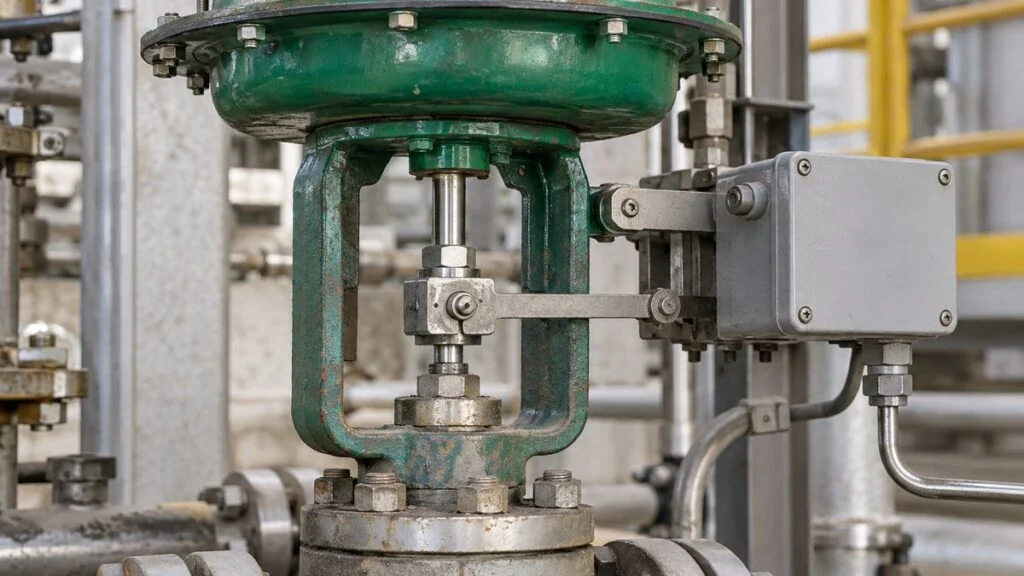
An automatic valve is moved by an electric actuator or by a pneumatic or hydraulic actuator, and it opens, closes, or throttles a flow path. The part that sends the command from the control room and the part that physically moves the valve plug are linked by wiring, air tubing, or both.
Japanese engineers use jutai in two ways. Sometimes it is a general word for a valve that moves late or erratically. Sometimes it is the name of a specific alarm in the monitoring system. In both cases, the valve did not move, or did not confirm its position, the way the command expected. The exact alarm condition belongs to each plant's control logic, so always confirm it there.
| Japanese term | Meaning | Names you may see in English systems |
|---|---|---|
| 渋滞 (jutai) | Valve slow, stopped partway, or not confirmed at the commanded position | Valve travel timeout, failure to open / failure to close, stroke time alarm, command/feedback discrepancy |
| 開指令 / 閉指令 (kai shirei / hei shirei) | Open command / close command | Open / close command (output) |
| 全開 / 全閉 (zenkai / zenpei) | Fully open / fully closed | Open / closed limit, end position |
| 確認信号 (kakunin shingo) | Confirmation signal from the valve | Position feedback, limit switch input; some systems call it an answerback |
| 固着 (kochaku) | Sticking or seizing | Valve sticking, seized stem |
| 手元 / 遠方 (temoto / enpo) | Local / remote operation | Local / remote selector |
Control systems from other vendors implement the same idea with different names. Foxboro's VLV block raises a timeout alarm when the requested valve state does not match the sensed state within a user-set interval. Rockwell's PlantPAX PVLV instruction separates a "full stall" (the valve never left its original position) from a "transit stall" (it moved but did not reach the target in time). That split is useful for a jutai alarm too, as the rest of this guide shows.
On-Off Valves vs. Control Valves
On an on-off valve, the typical problem is that the open command goes out but the fully-open confirmation never comes back, or the close command goes out but fully closed is never confirmed. A valve that never starts to move and a valve that moves but stops short of its end position point to different places to look.
A control valve also works at intermediate openings. Here the problem shows up as the actual position lagging behind a rising command, or the valve jumping when it should move in small steps. Stick-slip, where the stem alternately sticks and then slips, is a clue that friction is involved.
Even when the command is correct, check separately whether the actual position and the flow follow it. Splitting the problem into four things helps you find where reality departed from what was expected: the command, the actual position, the position feedback signal, and the process result.
The electrical signal is the command; compressed air is the power. Scroll sideways to see the whole figure.
Simplified diagram of a typical arrangement, including the feedback signal to the control system where a position transmitter is fitted. On-off valves often use a solenoid valve and limit switches instead, so the hardware varies.
Separating the command from the power source explains why a valve can receive a valid current signal and still not move: without supply air, nothing happens.
Related: Electro-Pneumatic vs. Pneumatic Positioners: How They Work
Limit switches confirm that the valve reached an end position. They do not directly confirm that fluid is flowing through the valve. Look at the stem and linkage, and at the flow and pressure trends, before you judge the plant's condition from the indication alone.
Log every event with the equipment tag and valve tag, and note which process step it happened in. "Won't open" that happens only at startup, only after the unit warms up, or only in one direction narrows down the cause.
How to Read the Alarm Condition
On-Off Valves: Command and Feedback Must Agree Within a Set Time
Some systems monitor on-off valves by checking whether the matching open or closed confirmation arrives within a set time after the command. When the alarm comes on, use the logic diagram to confirm which signal starts the timer and which contact stops it.
Take a hypothetical rule: "Alarm if the fully-open contact has not made 3 seconds after the open command." If the command goes out at t = 2 s and the valve reaches fully open at t = 6 s, the travel took 4 s. The deadline was t = 5 s, so the alarm trips.
An illustrative waveform, not measured data. It assumes the valve reaches fully open and the confirmation arrives at the same moment.
Vertical axis 0/50/100%, horizontal axis 0–8 s. Check the actual control specification for how the alarm latches and resets, and what happens if the command is canceled.
The real elapsed time includes several delays: the control output, solenoid valve switching, actuator travel, the limit switch making contact, and input processing. Do not compare the operator's click time on the screen with the command time inside the PLC (the programmable logic controller that runs the logic). Put both on the same time base.
The timeout is set to suit the valve type and size, the supply conditions, and the time the process can tolerate. Set it too long and faults are found late. Set it too short and normal strokes trip the alarm. The setting should come from the design conditions and the commissioning records.
Also check what happens if the open command is canceled mid-stroke or the valve is switched to local operation. If the timer keeps running after the reason for the stroke is gone, the alarm can time out for reasons unrelated to a valve fault.
If the screen history logs at a coarse interval, it can miss a contact that made only for an instant. Find out what a trend logged at one-second resolution and the controller's internal event log can actually show, and factor those limits into your conclusion.
Control Valves: Deviation Between Command and Actual Position
On a control valve, look beyond the end-position contacts. Watch the difference between the position command and the actual position, the response delay, and any repeated stop-and-jump movement. Do not judge by the size of the deviation alone. Record how long it lasted and whether it differs between the opening and closing directions.
If 4–20 mA maps linearly to a 0–100% position command, 12 mA is a 50% command. That converted value only tells you how the input signal is being interpreted. It is not the actual valve position or the flow.
Connecting a meter into the loop requires the right qualifications, a procedure, and a check of the process impact. Plan the measurement so it does not interrupt the signal.
Related: 4-20 mA vs 1-5 V: Why Japanese Panels Use 250 Ω Inputs
Whether a rising command opens or closes the valve depends on its specification: direct or reverse action, and normally open (NO) or normally closed (NC). A broken wire, a power loss, and a loss of supply air are not the same failure. Confirm separately which position the valve goes to in each case.
Related: Direct vs Reverse Acting Control Valves: NO/NC, FO/FC/FL
For example, with a 50% command and a 45% actual position, the deviation is 5 percentage points of full travel. Do not mix that with "10% of the command value," which is a different way to express it. Match the deviation you monitor to the definition in the specification.
Common Causes of Valve Sticking and Slow Strokes
Friction and Actuator Linkage
Packing that is overtightened or degraded, and a stem or guide that is scored or corroded, all add resistance to stem movement. If the command or air pressure has to build up before the valve moves, and then the position jumps once it starts, suspect friction.
Also inspect the coupling between the actuator and the stem for looseness or misalignment, and check drive parts such as gears. The actuator can move without the motion reaching the valve, so be clear about where the feedback signal is taken and which part you actually looked at.
Record separately whether the valve is hard to move only at the start of travel, slow over the whole stroke, or stops just short of closed. The force or torque needed changes along the stroke, so the actuator's rated output alone does not prove there is enough margin.
Conceptual cross-section of a linear-motion (sliding-stem) valve. It is not an instruction to disassemble the valve or loosen the packing during operation.
Azbil's instruction manual for its AGVB/AGVM control valves also separates the two symptoms. Sluggish movement points to deposits or hardened packing; no movement at all points to galling or a caught object. Do not lump every symptom under "stuck." Record the direction and position where it happens, because that is what lets you isolate the cause.
Power, Control Circuits, and Position Feedback
On a motor-operated valve, check for broken wires, low voltage, loose terminals, and tripped protective devices. Also check the local/remote selector and the interlocks that grant permission to move. After an operator acts on the screen, trace whether the output actually reached the field.
In the position feedback circuit, the suspects are a misadjusted switch, a bad contact, a broken wire, or a wrong input setting. If the valve is clearly fully open but only the open confirmation is missing, check the feedback circuit before you try to drive the valve further.
When both a closed contact and an open contact are used, in some setups neither contact is made while the valve is traveling. Whether the system also alarms when both contacts are made depends on the plant's specification. Do not decide which combinations are normal from the contact names alone.
Even a pneumatic valve depends on electrical signals at the solenoid valve and positioner, so "electrical or air?" is not a useful either-or question. Trace how far the sequence got: command, switching, output air pressure, stem movement, and feedback input.
Air Supply, Exhaust, and Lubrication
On a pneumatic valve, the header pressure can be normal while the supply still cannot keep up because of a clogged filter, a leak, or undersized tubing or components. Record the pressure drop during the stroke and compare it with the reading at rest.
Simplified diagram of a double-acting cylinder moving in one direction. Check the actual circuit drawing for tubing and flow-control settings.
A clogged exhaust restrictor or silencer keeps air from leaving the opposite chamber and can slow the stroke. Before raising the supply pressure to compensate, check both the supply and exhaust paths against the equipment specifications.
Water, oil, and dust in the air also affect how the components work. Check the air quality against the requirements of the specific solenoid valve and positioner you use.
Lack of lubrication causes trouble only where lubrication is required, and not every automatic valve needs oil. Some components are designed to run without lubrication, and some should not be oiled at all. Check the lubrication points, oil type, quantity, and lubrication history in the manual.
SMC's common precautions for solenoid valves explain that some products can be used without lubrication, but that once lubrication starts it should not be stopped, and that too much oil can cause malfunctions. Avoid the blanket fix of "it's moving badly, so add oil."
Debris Inside the Valve
Scale or other foreign matter inside the valve can block the guide or get caught between the plug and the seat. Besides stopping the valve partway, it can let fluid leak past even when the valve appears closed. Evaluate position and seat tightness as separate questions.
Line Pressure Loss vs. Differential Pressure Across the Valve
High pressure loss in the piping causes low flow, but it does not by itself mean the stem has stopped moving. If the actual position matches the command and flow is still low, check the supply pressure, line resistance, strainer clogging, and valve capacity.
On the other hand, if the differential pressure across the valve exceeds its specification, the actuator may not overcome the fluid force, and the valve may not reach fully closed. Keep the pressure loss of the whole line separate from the differential across the valve, and record the pressures on both sides at the operating point where the problem occurs.
A larger valve does not necessarily cure a jutai alarm. Review the required flow, operating opening, differential pressure, and actuator capability together.
What to Check First When the Alarm Comes On
The sequence below describes what to confirm and who decides. It is not a work instruction. Follow your plant's procedures, permit system, and lockout/tagout rules.
- Capture the data. Save the alarm time, the command and feedback states, the field position, and the flow, pressure, and temperature for the same time window. Do this before an alarm reset or a retry overwrites them. It is what lets you tell "the signal never arrived" from "the valve moved late."
- Agree with operations whether the valve may be moved. Confirm with the operators whether it is safe to stroke the valve, and whether the unit can be held with the valve where it is. For valves on cooling, heating, or reactant feed, a trial stroke in the field can create a new problem.
- Confirm the valve and the isolation boundary. Trace the valve and isolation boundary on the P&ID (piping and instrumentation diagram). Match the tag on the drawing with the tag in the field, and check for bypasses, backflow, and other supply sources.
- Separate inspection from intervention. Plan visual checks and record reviews apart from any work that involves manual operation, wiring changes, or disassembly. Before disassembly, isolate the process fluid, power, and air or hydraulic supply. Release stored pressure and spring force as the manual specifies, and confirm hot parts have cooled.
Related: How to Read P&ID Instrument Symbols: ISA-5.1 vs JIS
Record and confirm the condition first. Any hands-on work goes into a shutdown and isolation plan.
Locking and isolation methods follow each plant's work procedures. Energized or pressurized tests are a separate step, done only after reassembly and after confirming everyone is clear.
Once the data is saved, use what you observed to decide where to look next. The same alarm can point to very different places.
| What you observe | What to check next |
|---|---|
| The command never reaches the field | Local/remote selector, permissives, output and wiring |
| The command arrives, but the actuator does not move | Power or air supply, protective devices, solenoid/directional valve, actuator |
| The actuator moves, but the valve does not follow | Coupling, friction, debris, differential pressure |
| The valve is at the end position in the field, but no feedback input | Limit switch position, contacts, wiring and input |
| Actual position is correct, but flow is low | Supply pressure, line resistance, strainer, valve capacity |
Fixing the Cause and Preventing a Repeat
Inspect, Lubricate, and Remove Debris as the Manufacturer Specifies
In routine inspections, compare stroke time, leakage, unusual noise, supply pressure, and unstable feedback against the values recorded when the valve was healthy. Set the inspection interval from the operating conditions and the manufacturer's instructions, and record changes against the number of strokes and after long idle periods.
Lubricate only the specified points, with the specified oil or grease, and check any process-side requirements, for example on food or oxygen service. Loosening the packing or spraying oil just to make the valve move more freely can cause leaks or damage materials.
When debris is suspected, do not make "cycle the valve repeatedly in service to flush it out" a standard fix. Confirm what the product allows and how the process would be affected. If needed, shut down, isolate, remove the valve, and inspect the seat and guide for damage and deposits.
An upstream strainer reduces debris, but a finer mesh is not automatically better. Check the mesh count, the aperture size, and the pressure drop, and balance what the protected valve needs against how easy the strainer is to clean.
If debris keeps coming back after the screen is cleaned, trace it to the source: rust in the piping, construction debris, or carryover from a tank. Combine flushing before startup with screen inspections. Cleaning the valve alone does not prevent recurrence.
Correct the Piping, Air Supply, and Electrical Side, Then Retest
On the air side, check for leaks and kinks, clogged filters, the capacity of the regulator and tubing, and the exhaust path. Changing the pressure or a flow restrictor affects both stroke speed and actuator force, so confirm the specified range and the required performance first.
On the process side, review the differential pressure and required flow, and correct excessive differential pressure, line blockages, or a valve with the wrong capacity. If a larger actuator or a setting change is needed, give the manufacturer the operating conditions and confirm with them that the change is acceptable, including the allowable loads on the stem and seat.
On the electrical side, check the terminals, power supply, command output, and feedback input in turn, and repair the faulty point. Do not bypass protective devices or interlocks just to clear the alarm. Find out why the system is not permitting the valve to move.
After repair, with personnel clear and the equipment reassembled, test the valve in both the opening and closing directions. Check stroke time, feedback contacts, intermediate positions, required seat tightness, and process impact, and record any changed settings and the test conditions.
After a no-load test, check the effect of real operating temperatures and differential pressures as well. List how the test conditions differ from actual operation, watch the operating points where the problem is likely to recur, and confirm the fix worked.
Return any air pressure or local/remote settings changed for testing to the approved operating state before handover. Record what was repaired and what remains unconfirmed, so the next shift does not judge the valve by the presence or absence of an alarm alone.
Checklist and Questions for the Japanese Supplier
Jutai Alarm Checklist
- Alarm time, valve tag, and process step recorded
- Command, feedback, and field position saved before any reset or retry
- Alarm logic confirmed: which signal starts the timer, which contact stops it, and the timeout value
- Full stall (never moved) or transit stall (moved, did not arrive) identified
- Direction noted: opening, closing, or both
- Pattern noted: only at startup, only when hot, only at certain operating points
- Local/remote selector and permissive interlocks checked
- Supply air pressure recorded at rest and during the stroke
- Exhaust path, silencer, and flow restrictors checked
- Limit switch adjustment, contacts, and wiring checked against the actual position
- Differential pressure across the valve compared with its specification
- Lubrication requirement confirmed in the manual before any oil is added
- Operations agreed before the valve is stroked; isolation planned before any disassembly
- Retest in both directions, with settings restored and results recorded
Questions to Ask the Japanese Side
- What exactly is the alarm condition for 渋滞 (jutai) on this valve? Which signal starts the timer, which contact ends it, and what is the timeout value?
- How was the timeout chosen? What stroke times were recorded at commissioning?
- Does the alarm latch? How is it reset, and what happens if the command is canceled or the valve is switched to local?
- Is there a separate alarm when both limit switches are made at once, or when neither is made?
- What is the fail position on loss of air, loss of power, and loss of signal?
- Does the solenoid valve or actuator require lubrication? If so, which oil, where, and how much?
- What is the maximum allowable differential pressure for this valve and actuator?
- Is manual operation allowed, and what conditions apply (for example, power isolation first)?
Sample Inquiry Email
Subject: Valve [tag number] – jutai (travel timeout) alarm: alarm logic and stroke data
Hello [name],
We are getting a 渋滞 (jutai) alarm on valve [tag number] in [unit/process step]. It occurred at [time] during [opening/closing]. The command was issued at [time], and the [open/closed] limit confirmed at [time / did not confirm].
To troubleshoot, could you send us:
1. The alarm logic for this valve (timer start signal, end contact, timeout value, latch and reset behavior)
2. The stroke times recorded at commissioning
3. The fail positions on loss of air, power, and signal
4. The lubrication requirements for the solenoid valve and actuator
5. The maximum allowable differential pressure
Thank you,
[your name]
Limits of This Guide
- What a jutai alarm monitors, its timer start and stop signals, and its timeout value differ by plant, supplier, and control system. The plant's logic diagrams and specifications take priority.
- The 3-second timeout, the 4–20 mA mapping, and the 50% vs. 45% example are fictional values for illustration, not recommendations.
- The checks here describe what to confirm, not how to do the work. Isolation, lockout/tagout, energized testing, and work in hazardous areas follow your plant's procedures and local regulations.
- Lubrication, air quality, and allowable loads depend on the specific product. Confirm them in the manufacturer's manual.
FAQ
Will a Longer Alarm Timeout Fix a Jutai Alarm?
No. If the timeout really is too short, it should be reviewed, but a longer timeout does not make the valve move faster. Compare the stroke time with healthy-valve data and with the time the process needs, and record the basis for any new setting and the test results, so the change does not hide a fault.
Should I Oil a Valve That Moves Sluggishly?
Not automatically. Some components are designed for oil-free service or should not be oiled. Find where the friction is and why, check the specified lubrication points, oil type, and quantity, and address any corrosion, deformation, or debris at its source.
If the Valve Moves Under Manual Operation, Is It OK?
Not necessarily. Movement by hand does not test the actuator output, the signals, or the valve's behavior under process differential pressure, so those need separate testing. Check in the manual whether manual operation is allowed and under what conditions. For example, the Azbil AGVB/AGVM manual requires the power to be shut off before manual operation.
Does a Fully-Open Limit Switch Mean Flow Is Getting Through?
No. A limit switch confirms that the part it is mounted on reached a position; it does not measure flow. Check the upstream supply, other valves, and blockages, and confirm flow and pressure with the appropriate instruments.
If Supply Air Pressure Is Normal, Can I Rule Out the Air Side?
No. Normal pressure at rest can hide a pressure drop during the stroke, a clogged exhaust, or an internal leak. Check the supply and output pressures while the valve is moving, along with the supply and exhaust paths.
Sources
- Symptoms and inspection for control valves (troubleshooting table, manual operation): Azbil, AGVB/AGVM electric top-guided single-seat control valve instruction manual (Japanese)
- Valve positioners with diagnostics: Azbil, "Valve positioner with diagnostic functions" (Japanese)
- Control valve diagnostics for condition-based maintenance: Azbil, control valve diagnostics supporting condition-based maintenance (Japanese)
- Lubrication, air supply, and residual pressure: SMC, common precautions for 3/4/5-port solenoid valves (Japanese)
- Pressure drop and clogged filters and silencers: SMC, 5-port solenoid valve instruction manual
- Stem corrosion and gland examples: TLV, bellows valve technical data
- Timeout alarm comparing requested and sensed valve state: Schneider Electric (Foxboro), VLV valve block product specification sheet
- Full stall and transit stall alarms: Rockwell Automation, Process Valve (PVLV) instruction
Original article in JapaneseThis guide is adapted from a MONOSCOPE article written for readers in Japan: 自動弁の渋滞とは?動かない・遅い原因と警報条件の見方
About the editor
 MONOSCOPE EditorFOUNDER & EDITOR
Spent about ten years at a plant equipment maker and a plant engineering company, proposing, designing, and commissioning equipment, then moved into web marketing. Now a web consultant for B2B manufacturers, helping them explain their products and technology. Licensed in Japan as an Energy Manager and a Third-Class Chief Electrical Engineer.
Has run an engineering blog since 2017 (500+ articles) and a Japanese YouTube channel with about 20,000 subscribers. Each English guide is written from the Japanese shop-floor point of view and checked against the cited standards.