Junction Box (JB) on Japanese Drawings: Terminal Box Guide
A package unit (skid) arrives from a Japanese supplier. The electrical drawings show a box marked "JB-01," the scope split says "field wiring by others from JB," and a document titled tanshi-hyo lists dozens of terminal numbers. If you are the instrument or electrical engineer who has to connect the skid to your control system, you need to know what that box is, what is inside it, and where your scope begins.
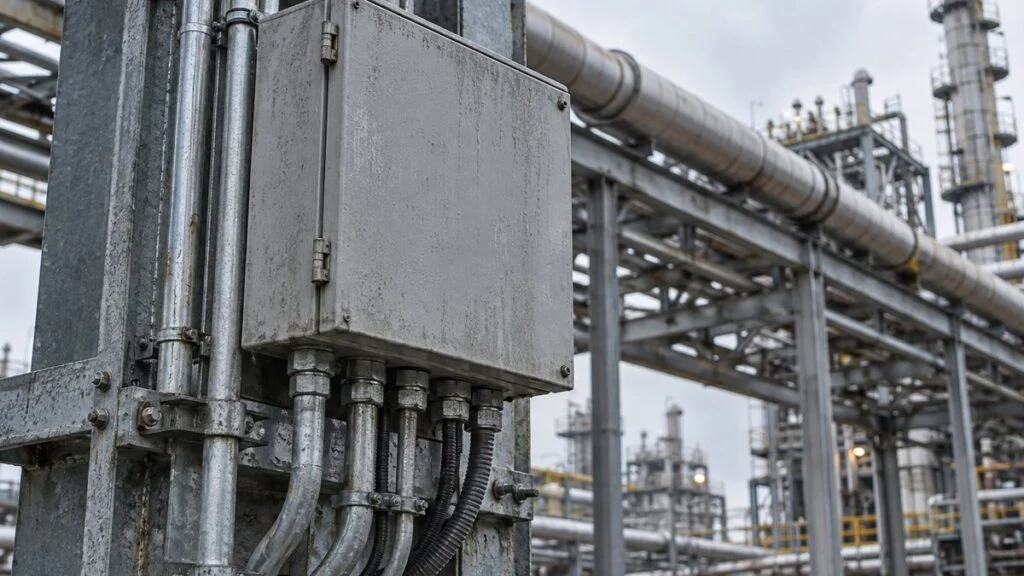
The short answer: JB stands for junction box. On Japanese plant and package-unit drawings, it usually means a box with terminal blocks inside that collects the wires from field devices and relays them to a multicore cable that runs to the control panel. In Japanese, this type is called a chukei tanshi-bako (中継端子箱), literally a "relay terminal box": a junction box with terminal blocks. It is sometimes written "JBOX."
This guide covers what is inside a JB, how it differs from a joint box and a pull box, how to read a JB terminal list, how to check the IP rating and explosion protection, and what to ask the Japanese supplier.
Contents
What Is a JB (Junction Box)?
A JB is a box that simplifies wiring when many devices have to be connected. The JBs used in plants have terminal blocks inside, so in this guide "JB" means a junction box with terminal blocks.
Package units with several devices built into one frame use JBs often, because a JB makes the wiring interface between the devices and the control panel much simpler. Japanese engineers call this boundary the toriai (取合い), the point where one party's scope of work ends and the next one's begins.
A typical JB contains:
- Terminal blocks: screw terminals that connect the wires from each device to the cores of the cable going to the control panel
- Cable entries: cable glands hold each cable and seal the gap against water and dust
- Ground terminal: for grounding the enclosure or cable shields, as applicable
JB vs. Joint Box vs. Pull Box
In Japanese building electrical work, a box where wires are spliced or branched is called a "joint box" (ジョイントボックス). A plant JB differs in one practical way: it has terminal blocks, so wires are screwed down and can be disconnected and reconnected.
The names themselves are not strictly defined. Panasonic's electrical and construction glossary says a joint box is also called a junction box and that there is no difference implied by the name. The real difference is how each industry uses the box.
All three are boxes that wires pass through, but each does a different job inside.
Typical usage only. Names vary by company and by the legend on each drawing. Japanese building work also has a "cable joint box (with terminals)" (Ministry of Land, Infrastructure, Transport and Tourism, Standard Drawings for Public Building Equipment Work).
Building wiring needs joint boxes because splicing wires inside a conduit is not allowed. Splices go inside a box placed where it can be inspected.
Because joint boxes are so common in building work, "JB" on a building drawing or in conversation may mean a joint box rather than a terminal box. Check the drawing legend or the specification to see which one is meant.
Related: Interlock Circuit Diagrams: How to Read Japanese Drawings
Why Japanese Package Units Use a JB
A JB reduces the number of wiring interfaces and keeps the wiring simple.
Wires from each device come into the JB, and one multicore cable carries them all to the control panel.
The run from the JB to the control panel is usually a multicore cable that bundles many pairs.
Take a skid with a tank surrounded by a pump, a control valve, a flow meter, a temperature sensor, a pressure sensor, and a solenoid valve. To operate these devices and display their readings, the power and signal wiring has to be connected to the control panel or a DCS.
Without a JB, each device has its own wiring method, so the electrical contractor has to check every device's manual and specification. Each run is also a different length and has to be cut to fit. On top of that, these devices are often delivered as separate items while a contractor handles the electrical work, which multiplies the interfaces and the coordination.
With a JB, the skid has a JB at its edge and every device on the skid is wired to it. If the JB is the interface point with the electrical contractor, nobody has to check each device's wiring method on site, and the installation schedule gets shorter. The distance from the control panel is the same for all signals, so one multicore cable can carry them, which keeps the wiring simple. Many plants receive these signals in a DCS (distributed control system) instead of a control panel.
Without a JB, every device needs its own run to the panel. With a JB, the skid hands over at one box.
Simplified illustration. Power and signal wiring are drawn as single lines.
A JB helps during installation and again during inspections and modifications after startup.
The first three benefits pay off during installation. The fourth shows up after startup: when a signal does not arrive, you can use the JB terminals to tell whether the fault is on the device side or the control panel side.
Many of the signals relayed through a JB are 4–20 mA analog signals. When a shielded cable passes through a JB, the shield is also connected through a terminal, and the basic rule is not to add a ground at the JB. Air-operated control valves also need instrument air piping, separate from the electrical wiring.
Related: Cable Shield Grounding: One End vs Both Ends, Japan Specs
Related: 4-20 mA vs 1-5 V: Why Japanese Panels Use 250 Ω Inputs
How to Read a JB Terminal List
What connects to each terminal is recorded in a terminal list (tanshi-hyo, 端子表), which serves as the JB's wiring diagram. Figure 5 shows a fictional example.
Each terminal row shows the device it connects to and the core number of the cable to the control panel.
All tags, terminal numbers, and core numbers are fictional examples. A real terminal list also shows the cable number, type, and size.
To read it, follow one signal. The two wires from pressure transmitter PT-101 land on JB terminals 1 and 2. From there, the signal moves to cores 1 and 2 of the multicore cable and reaches an AI (analog input) on the control panel. When you hunt for a broken wire, check the terminals in that same order.
AI, DO, and DI in the "Signal" column give the signal type and direction; see DI/DO, AI/AO, PI/PO Meaning: Reading a Japanese I/O List. Tags such as PT-101 usually match the instrument numbers on the P&ID (piping and instrumentation diagram).
Related: How to Read P&ID Instrument Symbols: ISA-5.1 vs JIS
Choosing a JB: IP Rating and Explosion Protection
Fewer items get missed if you settle the JB specification in this order: installation location, then water and dust protection, then explosion protection, then the number of terminals.
- Outdoors or where water can reach the box, choose an enclosure with a high IP (ingress protection) rating and use cable glands at the cable entries.
- In hazardous areas with flammable gas or dust, use an explosion-protected enclosure that matches the area classification.
- Provide spare terminals for future devices and for broken wires. The percentage of spare terminals is often set by the owner's specification or design standard.
- A terminal list posted inside the door, showing each terminal number and destination, saves time during inspections and modifications.
Reading the IP Code
In an IP code, the first digit is protection against solids (dust) and the second is protection against water. In Japan, the standard was JIS C 0920 (corresponding to IEC 60529) for many years. On January 20, 2026, its successor JIS C 60529 was established and replaced it.
In IP66, the first 6 means "no dust gets in" and the second 6 means "withstands powerful water jets."
6 = dust-tight: no dust enters
5 = water jets from any direction
6 = powerful water jets from any direction
7 = immersion under specified conditions without harmful effect
Summarized from the JIS C 0920 categories, based on Canon's explanation. The successor JIS C 60529 incorporates IEC 60529 through its 2013 amendment and adds "9" for high-pressure, high-temperature water jets (as reported by PHILE WEB on the Japanese Standards Association announcement).
For an outdoor JB, look at how rain and washdown water will hit it, and specify the digits you need in the specification. Keep in mind that the IP rating applies to the enclosure itself. If the cable entries are poorly sealed, water still gets in. Choose cable glands and gaskets with the same level of protection as the box, and tighten them as the manufacturer specifies.
Hazardous Areas and Explosion Protection
In Japan, hazardous areas are classified by the substances handled and the ventilation. For gases and vapors, there are three zones:
- Zone 0 (tokubetsu kiken kasho, special hazardous location): an explosive gas atmosphere is present continuously or for long periods
- Zone 1 (dai-ichirui kiken kasho, first-class hazardous location): an explosive gas atmosphere is likely to occur in normal operation
- Zone 2 (dai-nirui kiken kasho, second-class hazardous location): an explosive gas atmosphere is not likely in normal operation and, if it occurs, lasts only a short time
Article 280 of Japan's Ordinance on Industrial Safety and Health prohibits using anything other than explosion-protected electrical equipment in places where, even with ventilation and other measures, concentrations may reach explosive levels. JBs fall under this rule too.
Two protection types are common for terminal boxes:
- Flameproof (Ex d): if gas inside the enclosure ignites, the enclosure withstands the pressure and does not pass the flame to the gas outside
- Increased safety (Ex e): extra measures on insulation, temperature rise, and similar factors keep sparks and hot spots from occurring in normal use
Only a limited set of protection types is allowed in Zone 0. Follow the area classification already set for the site, choose a protection type that matches it, and select a box that has passed Japan's national type examination (keishiki kentei). For how Japanese Ex d and Ex e markings compare with IECEx and ATEX, see Ex d vs Ex e: Japanese Explosion-Proof Marks and TIIS.
If the skid will be installed outside Japan, the certification your site accepts is decided by the local rules and the owner's specification, not by the Japanese classification. Confirm this before the JB is ordered. JB selection is part of the overall control panel design.
Related: Japanese Machine Control Panels: UL 508A, NFPA 79, and CE
Checklist: Questions to Ask the Japanese Supplier About the JB
Use these questions when you review the drawings for a package unit with one or more JBs.
- Interface point: Which JB terminals are the scope boundary? Who wires from the devices to the JB, and who wires from the JB to the control panel?
- Terminal list: Do you have the latest revision of the terminal list (tanshi-hyo)? Do the tags match the P&ID and the I/O list?
- Cables: What cable number, type, size, and core count does each terminal row assume for the outgoing multicore cable?
- Cable entries: How many entries are there, in what size and on which face? Who supplies the cable glands?
- IP rating: What IP rating do the enclosure and the cable glands have? Does it suit the installation location (outdoor, washdown)?
- Hazardous area: Which zone is the JB designed for, which protection type does it use (for example, Ex d or Ex e), and which certification does it carry? Does that certification meet our site's requirements?
- Shield and ground: Where are cable shields grounded? Are shields relayed through the JB without being grounded there?
- Spares: How many spare terminals and spare cores are provided?
- Documentation: Will a copy of the terminal list be posted inside the JB door?
Where This Guide Does Not Apply
- "JB," "joint box," and "terminal box" are used differently by company and industry. The drawing legend and the specification decide what a given box is.
- The terminal list in Figure 5 is fictional. Column layout, numbering, and the grounding rule for shields depend on the project's design standard.
- This guide is not a wiring or installation procedure. Grounding, hazardous-area selection, and installation are decided by the responsible engineer under the applicable codes and the owner's specification.
- Japan's IP standard changed from JIS C 0920 to JIS C 60529 in 2026, so documents written before 2026 cite JIS C 0920.
FAQ
What Does JB Stand For on an Electrical Drawing?
JB stands for junction box. In Japanese plants it is also called a chukei tanshi-bako (a junction box with terminal blocks) and is sometimes written "JBOX."
What Is the Difference Between a Junction Box and a Joint Box?
The names have no fixed distinction and can refer to the same box. In practice, a plant JB relays wires through terminal blocks, while a joint box in building work is where wires are spliced to each other.
What Does JB Mean on a Building Drawing?
In building work, JB may mean a joint box. Check the drawing legend, the specification, or whether the box has terminal blocks inside.
What Is the Difference Between a JB and a Local Control Panel?
A JB only relays wires and has no switches or lamps. A local control panel (genba sosa-ban) has switches for operations such as start and stop, and it is used to operate the equipment.
Summary
- JB stands for junction box. On Japanese plant drawings it is usually a chukei tanshi-bako, a junction box with terminal blocks inside.
- JBs are mainly used in package units that combine several devices.
- A JB simplifies wiring routes and gives one interface point between the supplier's and the contractor's wiring.
- "Junction box" and "joint box" are not strictly different names; the difference is use (relaying through terminals vs. splicing wires).
- Outdoors, check the IP rating and the cable entries. In hazardous areas, choose an explosion-protected box that matches the area classification.
Sources
- Joint box and pull box definitions, names, and locations: Panasonic, electrical and construction glossary, "Joint box" (Japanese)
- No splicing inside conduit: Panasonic, electrical and construction glossary, "Flexible metal conduit" (Japanese)
- Symbols for joint boxes, pull boxes, and cable joint boxes with terminals: Ministry of Land, Infrastructure, Transport and Tourism, Standard Drawings for Public Building Equipment Work (Electrical), 2022 edition (Japanese)
- Meaning of IP code digits: Canon, "What is IP66?" (Japanese); Japanese Standards Association, JIS C 0920:2003 preview (Japanese)
- JIS C 60529:2026 establishment date, replacement of JIS C 0920, and corresponding IEC 60529 edition: Japanese Standards Association, JIS C 60529:2026 preview (Japanese); addition of IPX9: PHILE WEB, February 16, 2026 (Japanese)
- Hazardous area classes, protection types, and Article 280 of the Ordinance on Industrial Safety and Health: Panasonic, facility lighting technical data, "Explosion-proof luminaires" (Japanese)
Original article in JapaneseThis guide is adapted from a MONOSCOPE article written for readers in Japan: JB(ジャンクションボックス)とは?中継端子箱の役割とジョイントボックスとの違い
About the editor
 MONOSCOPE EditorFOUNDER & EDITOR
Spent about ten years at a plant equipment maker and a plant engineering company, proposing, designing, and commissioning equipment, then moved into web marketing. Now a web consultant for B2B manufacturers, helping them explain their products and technology. Licensed in Japan as an Energy Manager and a Third-Class Chief Electrical Engineer.
Has run an engineering blog since 2017 (500+ articles) and a Japanese YouTube channel with about 20,000 subscribers. Each English guide is written from the Japanese shop-floor point of view and checked against the cited standards.